Packages extend the functionality of the IDE and programming; they can contain object classes and/or visual/non-visual components. Lazarus comes with many of them, but a good portion are not installed; they are additional add-ons that you decide whether or not to install after installation. It's a good recommendation to only install the packages you need as a foundation for your projects; avoid adding what you don't need or don't even know the purpose of.
You will go to Package|Install/Uninstall Packages, There you will see a list of various packages that come with Lazarus. Those prefixed with "fp" belong to the FreePascal library, and their maintenance usually comes with the compiler and doesn't necessarily depend on the Lazarus team for support. Packages with the prefix "laz" are usually dependent on the IDE/Lazarus. See the list:
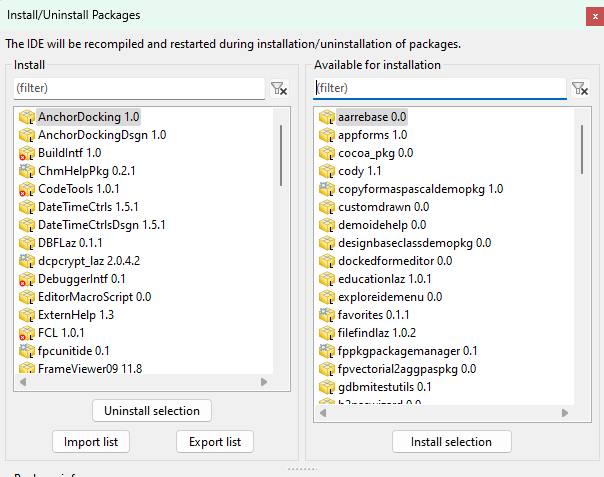
Below I show the list of basic add-ons that I usually install:
- imagesforlazarus: Allows the Lazarus IDE to handle various image formats and even incorporate it into its components like TIamge if it supports them. In addition, it creates classes to deal with these same formats called: TPNGImage, TPNMImage, TJPGImage, TBMPImage, TTGAImag and, TXPMImage. Read the README.TXT in the \components\images folder to learn more.
- lazdbexport: I haven't tested it yet, but it gives some components(TDataset) the possibility to export their data to some external formats like csv.dbf,rtf,… See this explanatory page.
- onlinepackagemanager: This is normally installed, however in editions where lazarus was compiled directly from sources, for example using fpcupdeluge it must be installed later. The online package manager allows us to visit a remote repository of libraries and components and install them through a GUI. I talk more about this component in this article.
- AnchorDocking: Allows the IDE to have its panels docked or docked, treat controls as if they were forms, use the mouse to drag and dock forms together, but by itself it won't make everything ready like the Delphi IDE, for that it is necessary to add other components as explained in this article.
- AnchorDockingDsgn: Use the previously installed anchorDocking to create a different IDE look where various panels and forms are already docked and ready for a new experience, very similar to the Delphi XE IDE with the exception of the design form that some prefer to be "loose" ” from the others. More information about him can be read in this article.
- dockedformeditor(Optional): As mentioned, AnchorDockingDsgn creates an IDE interface with many docked panels similar to the Delphi XE interface, but the design form is the only one that is not docked. However, when you install this component, the design form will also be docked with the others. More information is explained below. in this article.
- filefindlazDistributes a unit called "FileFind" and also a TFileSearch component. Used for recursive (or non-recursive) file searches in the file system.
- favorites: Creates a third section (at the top) in the drop-down menu of the Open tool button, where you can register your favorite projects.
- lazReport and LazReportPDFExport(Optional): These two packages constitute lazReport, a fork of the FreeReport 2.32 project. It has a Report Engine, Designer, and Previewer. I'm still studying it, and it seems quite promising.
- lazfpreportdesign and lazidefpreport(Optional): Despite the "laz" prefix, this package refers to fpReport (its original name), a report generator similar to LazReport. One of its advantages is that it doesn't depend on LCL; that is, you can create a report without a graphical interface, directly generating a PDF. This is very useful for those who develop technologies like CGI for web servers.
After them, I can even install others, but it is not possible to proceed without these.